

Character movement provides visual stories with emotion, personality, and physical believability. Mocap is a technology that captures actors in motion to use in digital animation. Performers, special equipment, calibrated space, and technical cleanup may be necessary for traditional workflows. These requirements can add production time and costs. Another method to explore character performances is with the video scenes generated by Dreamina AI. Creators can come up with movement concepts without setting up a special mocap session for each concept. But generated motion should not be used without careful review since anatomic accuracy and consistent physical behavior cannot be assured.
What Natural Character Movement Actually Looks Like
Natural movement is a balance of coordinated gesture, awareness of the environment, and believable timing. With Dreamina’s AI video from text workflow, creators can convert complex written instructions of the movements into animated scenes, allowing them to experiment with physical performances without motion capture. For instance, someone seated should bend their knees and lower themselves in a natural way. When someone is saying hello to a friend, they may make eye contact before holding up a hand. Reaching and grasping a cup involves lifting and making hand adjustments. These are actions that are connected body movements, not just single gestures. The visualization of such sequences is possible using Dreamina AI, but the results generated may have inconsistencies. It is easy to understand or judge each action with clear physical direction.
How Text-to-Video AI Generates Character Actions Without Recorded Performance
Text-to-video systems are those that create moving content from a written description, relying on learned patterns of visual information to determine requested actions. The model generates motion instead of recording an actor’s movement—certain verbs like walking, reaching, turning, sitting, and waving express observable actions. Movement can also be affected by environmental elements, such as furniture, doors, or objects held in the hands. Facial expressions, posture, and gestures are visible or not, depending on how the camera is framed. Dreamina AI can assist in this visualisation of concepts, character creation for promotional clips, scenes for storytelling, and initial animation planning. But describing an action doesn’t ensure proper timing, realism of action, or repeatable choreography.
Steps to Get Natural Character Movement Without Mocap Using Text to Video
Step 1: Open Dreamina and describe your character’s actions
- Sign up or log in to Dreamina to start animating characters from simple text alone.
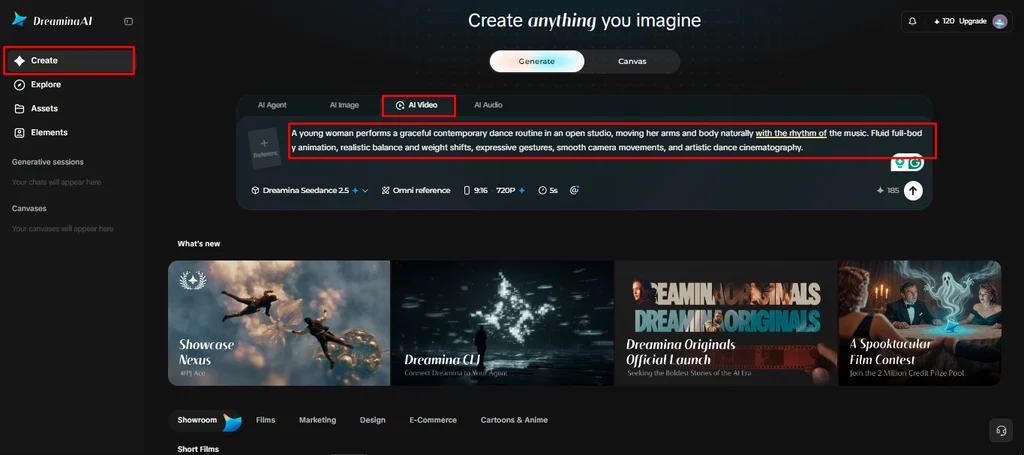
- Next, open the “Create” tab from the left menu and choose the “AI video” option.
- Enter a detailed text prompt on how you want the video to look and feel. Add video elements, sound, background, theme, and concept, plus how the character walks or gestures.
Step 2: Pick a model and set up natural motion
- Then choose a model from the options present at the bottom of the dialogue box.
- Options include Dreamina Seedance 2.5, Dreamina Seedance 2.0, and Dreamina Seedance 2.0 Fast, among others. Dreamina Seedance 2.0 Mini and Dreamina Seedance 1.0 also work for simpler character shots too.
- Click “Omni reference” so multiple reference images can guide the AI toward accurate video results.
- Pick a custom aspect ratio and resolution from the “Aspect ratio” and “Resolution” tabs now.
- Finally, click the “Generate” tab to begin creation and watch your character move very naturally.
Step 3: Polish the performance and export
- If the movement feels off, use “Edit prompt” or “Regenerate” to refine the results.
- You can also tweak the generated video using the “Edit video” option for better posing.
- Use “Edit segment” to adjust just one gesture or step instead of the whole video.
- Use “Extend video” to lengthen the action, or apply “Creative upscale” to improve video quality.
- Dreamina gives you complete freedom to edit your character video the way you like it.
- Finally, click the “Download” tab at the top right to save the video file locally.
Writing Character Prompts That Communicate Physical Performance
Good prompts are words that explain what you can see, not just words for personalities. A walking character may have a consistent speed, relaxed arm swing, stable posture, and clear direction. Curiosity can be seen in a slight tilt of the head, a pause, and a measured gaze shift. When picking up an object, talk about the nature of the person reaching forward to get it, grasping it, lifting it, and moving it carefully. To rotate, indicate the direction of rotation and the character’s final direction. Greeting could involve relaxed shoulders, a small wave, and eye contact. Sitting involves getting to the seat, flexing the knees, lowering to the seat, and settling in. These sequences provide Dreamina AI with more detailed visual instructions than standard instructions like “move naturally. Limit each prompt to one major action, for easier evaluation and revision.
Using References to Guide Character Appearance and Movement
Text-only generation is good for when you’re starting to work out some ideas and are willing to be creative. Photos can be used as a reference to help with clothing, facial details, body ratios, and composition. Dreamina AI provides supported reference controls, such as Omni reference, to lead in the direction of visual uniformity. If a model allows videos, the videos can convey movement, timing, camera direction, or relations between space more directly. Repeat key character descriptions in multiple prompts when there are similar cues. However, these references provide direction for generation, not replicate results. Appearance consistency and motion consistency are two distinct problems: a character can be recognisable when walking in an unnatural way or operating an object in a way that is not natural. Check each individual clip before stitching together scenes into a longer clip.
Understanding the Limits of Mocap-Free Character Generation
AI-produced performances are good for concept development and short creative videos as well as story visualization, while some tasks require more control. Several characters can interact in complex ways, which may necessitate extra reference and regeneration. Small characters manipulated by hand gestures may cause errors when they are presented in close-up. Long sequences are likely to require several clips, attentive editing, and continuity fixes. Choreography and repeatability could still be more suitable for motion capture or keyframe animation. When dealing with identifiable persons or performance references, consent and usage must be managed in professional production, as well. Review created footage for anatomical irregularities, out-of-place movements, lack of consistency with the object’s contact, and rapid shifts in appearance. While Dreamina AI can lessen setup requirements, it is not a fix-all solution for all production challenges or a substitute for specialized techniques in every case.
Conclusion
Dreamina AI guides creators in experimenting with character movement through written instructions and assisted visuals. Revise performances with specific action sequences, appropriate camera framing, and focused revisions. Also, reference controls can be used to preserve familiar character appearances from one scene to another. Nevertheless, synthetic movement requires careful analysis, especially if fine choreography or realistic object interactions are important. Begin with one obvious action, explain what is happening physically, and view the clip. Iterate the prompt as needed and then apply specific animation techniques as required. Thoughtful direction, realistic expectations, and consistent quality checks are the first steps in believable character movement.
Also Read
- https://synonymlabi.com/how-word-choice-shapes-the-clarity-and-persuasive-power-of-legal-writing/
https://synonymlabi.com/enjoy-summer-food-parties-with-quality-gas-grills/
https://synonymlabi.com/frictionless-transit-navigating-international-flight-cycles-with-ryan-londons-iphone-18-suite/