
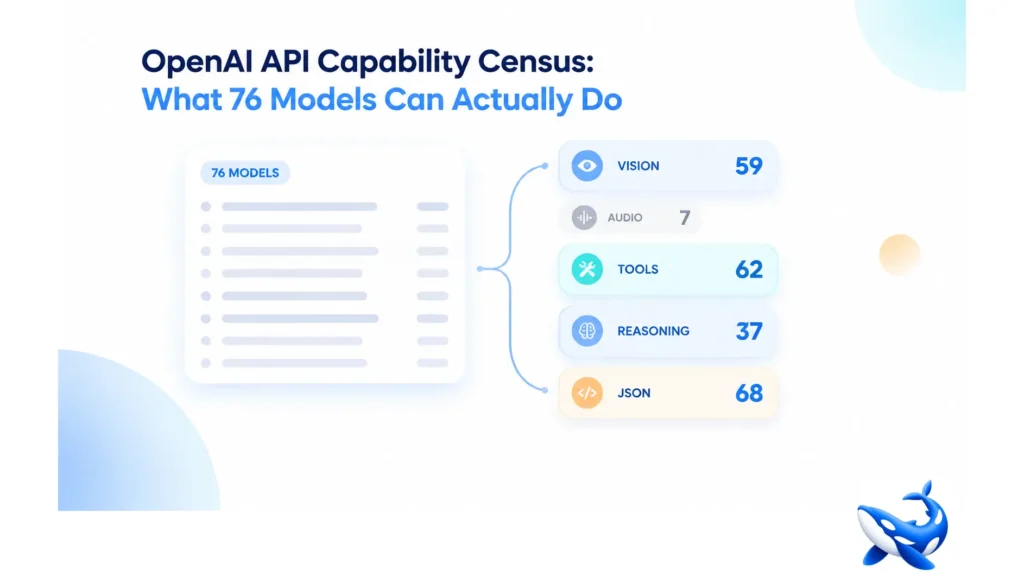

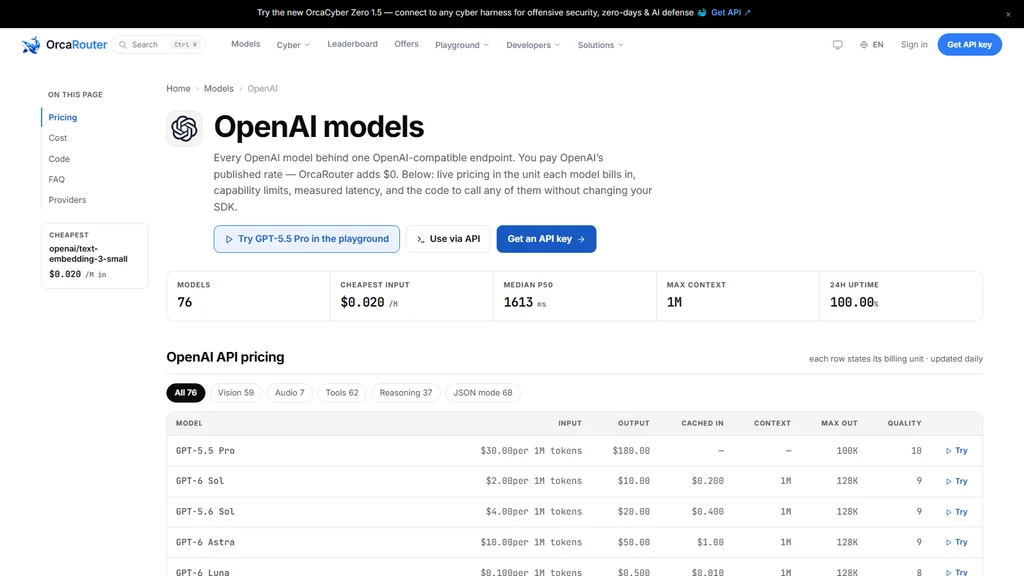
A catalogue of 76 OpenAI models answers the count question in one word, but what the 76 can do takes five numbers: vision on 59, audio on 7, tool calling on 62, reasoning on 37 and JSON mode on 68. On OrcaRouter the OpenAI API page prints both — a header that reads 76 models, a cheapest input of $0.020/M and a median p50 of 1600 ms, plus one FAQ line that counts the catalogue by capability. The header tells you the catalogue exists. The census tells you what it is for.
Read the five numbers together and a shape appears: this is a catalogue built for text in and text out, for structured output and for tool use, with vision as a broad second tier — and, in a single small corner, audio.
What the five numbers say about the catalogue
Start with the widest number. JSON mode is available on 68 of the 76 rows — 89% of the catalogue — which makes structured output the least gated capability on the page, a deliberate near-default for a platform whose customers are mostly calling from code [OURS]. Tool calling runs just behind at 62 rows, 82% [OURS]. Both numbers say the same thing: the catalogue assumes its models will be wired into applications that expect function calls and typed responses, not prose back and forth.
Vision on 59 rows is broad but not universal [OURS]. Roughly three quarters of the catalogue can take an image, and the remaining 17 rows mean an image workload still drops a real slice of the list.
Reasoning on 37 rows is the split that does the most filtering [OURS]. Under half of the catalogue carries a reasoning capability, and if reasoning is the thing your job cannot skip, the 39 rows without it are gone before a single price is read. Note what kind of split this is: the reasoning count divides the catalogue in half, while the JSON count covers nearly all of it, and those two facts together tell you more about the catalogue than either one alone.
Audio on 7 rows is the number that tells the story of the page [OURS]. Nine per cent of the catalogue hears, and the seven rows are the narrowest shelf OpenAI lists here. That is not a value judgement — a vendor can legitimately decide speech is a niche — but it is the single most useful planning datum on the page: a team choosing a model for a voice or transcription workload is choosing from seven rows, not seventy-six.
The census runs before the price column
A catalogue is read in the order that cuts it fastest, and capability cuts faster than price. The census is near-binary per row — a model either carries vision or it does not — while price is a continuous spread, so comparing prices across rows that fail your capability cut is wasted arithmetic.
The cheapest row on the page makes the point. openai/text-embedding-3-small sits at $0.02 per million input tokens, the low anchor of the entire input column, and it is the cheapest OpenAI row here [VENDOR]. But it returns a vector rather than a completion, so it does not compete with any text-generating row: its price is a component price for retrieval, not a cheap way to generate. A capability census is exactly what tells you that an embedding row is a different animal — read it as the price of a retrieval stage, not as the low end of the model market.
Do the cut first. For a reasoning workload, the 37 carries the whole choice. For a voice workload, the 7. For structured extraction, the 68. The rows that survive are the rows worth comparing on price, and on this page the surviving set is usually a shortlist before the calculator comes out.
Where the numbers sit on the page
The header prints the catalogue’s headline statistics in one line: 76 models, a cheapest input of $0.020/M, a median p50 of 1600 ms and a max context of 1M [OURS] [VENDOR]. The cheapest-input figure resolves to openai/text-embedding-3-small at the rate above [VENDOR]; the median p50 is our own production telemetry across the catalogue [OURS]; and the 24h uptime line shows 100.00% today, which is a live figure and will move [OURS].
The census lives one level down. The page’s own FAQ asks what the catalogue can do and answers with the five counts — vision, audio, tools, reasoning, JSON mode — so the numbers are not our editorial summary but a printed part of the page, counted across the catalogue exactly as we read them here.
One more column deserves its label. The quality digit, a 0-to-10 score we build ourselves from the dimensions we grade each model on, is our own composite rather than a third-party benchmark score, and we say so in the same breath wherever the number appears [OURS]. It is deliberately coarse — it places a row in a tier, it does not adjudicate between two rows on the same digit.
Two registers on the same page
A catalogue page mixes two prose registers, and quoting them as one number is the classic mistake. The context column of the pricing table prints 1M for most rows — that is the table’s short-form figure [VENDOR]. The FAQ answers the largest-context question in spoken prose: GPT-6 Sol, at 1050K tokens. Same model, two registers, and the two figures must never land in the same sentence as if they were one number. When you quote the table, say 1M. When you quote the FAQ, say 1050K.
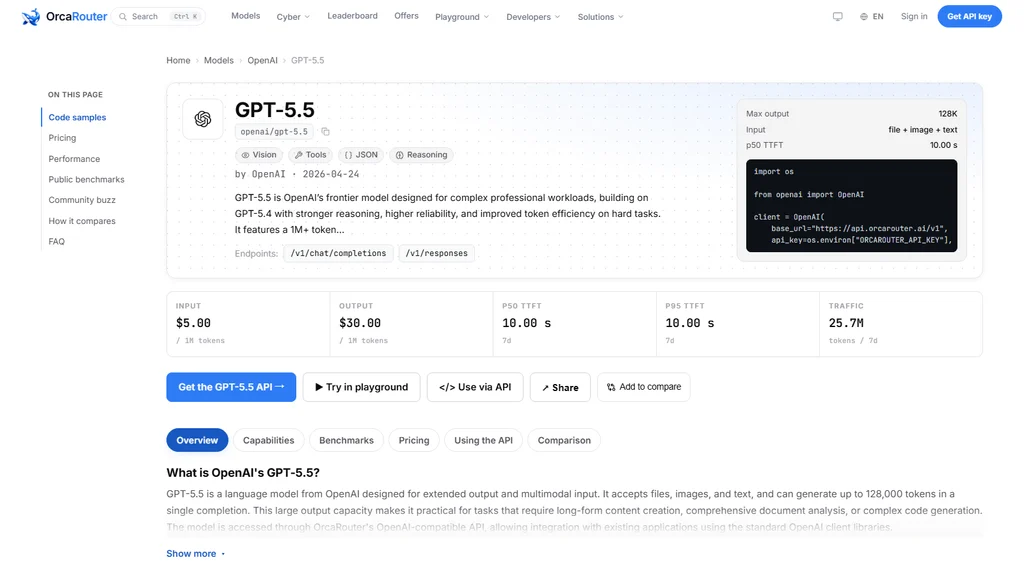
Latency lives in two registers as well. The header’s median p50 of 1600 ms is a catalogue-wide statistic in milliseconds [OURS]. Individual model pages quote their own time-to-first-token in seconds, which is a different measurement on a different scale. GPT-5.5’s model page, for example, quotes a p50 time-to-first-token of 10.00 seconds [OURS]. Neither figure is wrong; they answer different questions, and mixing milliseconds and seconds in one sentence turns two true numbers into a nonsense one.
What one row looks like after the census
The census sorts the catalogue; the model page prices and measures one row of it. Take GPT-5.5, whose model page is a clean example. It carries its own rate card — $5.00 per million input tokens and $30.00 per million output [VENDOR] — and its own production telemetry block, which is where a catalogue-wide median meets one model’s measured behavior. The census told you the model exists inside the capability set; the model page tells you what running it costs and what live usage says about it.
That two-step read is the whole method. Start with the census to build the shortlist of rows that can do the job. Then open a shortlisted model’s page for its rate card and its telemetry. The catalogue page is a filter, and the model page is the contract.
The takeaway
A model count is a single number; a capability census is a plan. The five figures — vision 59, audio 7, tools 62, reasoning 37, JSON 68 — tell you what OpenAI’s 76-model catalogue is actually for, where its coverage thins to a shelf of seven, and which shortlist your workload is choosing from. Read the census before the price column, treat the table and the FAQ as two registers, and a seventy-six-model page becomes a decision instead of a wall.
Sourcing note: the model count, the header statistics, the pricing table, the capability census and the largest-context answer come from the OrcaRouter OpenAI catalogue page. Published per-million-token rates and vendor-declared capability and context figures are the provider’s own [VENDOR] presented on our catalogue page; the census counts and the model count are our enumeration of what the page lists [OURS]. The median p50, the model-page time-to-first-token and the uptime figure are our own production telemetry [OURS]. The 0-to-10 quality column is our own composite, built from the dimensions we grade each model on, and is not a third-party benchmark. Percentage figures are arithmetic on the census counts, not published statistics. Read 2026-10-15.
Also Read
- Safe and Structured Healing: The Complete Guide to At-Home Detox Support
- Moving Across the Country: Planning Support for Military Families
- Safe and Structured Healing: The Complete Guide to At-Home Detox Support