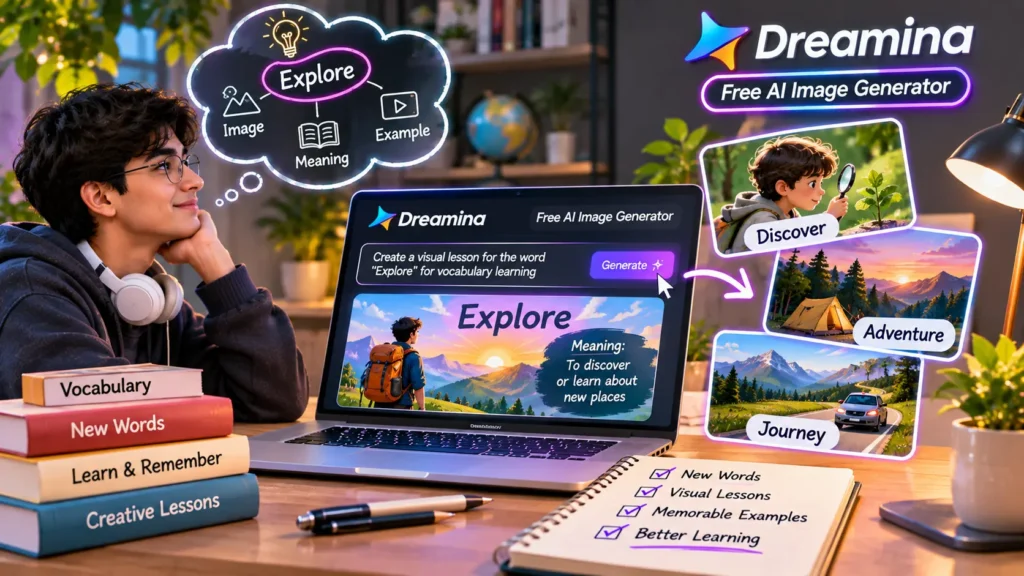

Learning a new language involves more than memorizing translations. A learner may recognize a word on a page but struggle to remember it during a conversation. This often happens because vocabulary is learned without enough context. Using ai image generators to create relevant visual examples can help connect unfamiliar words with recognizable objects, situations, and experiences.
AI image generators offer an additional way to make language lessons more visual. Teachers, tutors, and independent learners can use written prompts to create illustrations for vocabulary activities, classroom exercises, and personal study materials. Rather than relying only on generic textbook pictures, they can develop images around the words and situations they actually want to teach.
When a Picture Makes a Word Easier to Understand
Some words are straightforward to explain. Others are difficult because they describe an action, feeling, or situation rather than a physical object. A picture of an apple can help introduce a basic noun, but explaining words such as “hesitate,” “crowded,” or “relieved” requires a little more thought. A carefully planned visual scene can show someone pausing before making a decision, people waiting in a busy station, or a person relaxing after completing a difficult task.
These examples give learners a situation to associate with the vocabulary. The image does not replace a definition or an explanation from a teacher. It provides another way to understand how a word is used. This can be particularly helpful for younger learners and beginners who have not yet developed a large vocabulary in their new language.
Create Vocabulary Sets Around Everyday Situations
Instead of creating unrelated pictures for individual words, organize them around familiar activities. This helps learners see how different terms work together in real situations. Consider a lesson about visiting a grocery store. The vocabulary set could include words for food, containers, prices, quantities, and common actions. A series of images might show a shopper selecting vegetables, comparing prices, placing items in a basket, and paying at the checkout.
A similar approach could be used for traveling, visiting a doctor, preparing a meal, or asking for directions. Each collection introduces vocabulary within a recognizable setting. When preparing prompts, keep the visual direction consistent. Similar backgrounds, illustration styles, and character appearances can make a collection feel like one connected learning resource. Dreamina can be explored as one option for creating these kinds of supporting visual materials.
Use Contrasting Images to Explain Confusing Words
Learners sometimes confuse words because their meanings are closely related. Visual comparisons can make the difference easier to notice. For example, a lesson could compare “empty” and “full” using two similar containers. Another could demonstrate “above” and “below” through objects positioned in relation to a table. To teach “borrow” and “lend,” an illustration could show two people exchanging a book, accompanied by separate explanations of each person’s action.
The key is to keep the comparison simple. If several unrelated objects appear in the same picture, learners may focus on unnecessary details rather than the difference being taught. Teachers can also ask learners to describe what has changed between two images. This turns a visual reference into an active speaking or writing exercise instead of a passive viewing activity.
Give Abstract Vocabulary a Human Context
Emotions, social behavior, and personal qualities can be difficult to represent through ordinary objects. However, scenes involving people can provide useful clues. A picture showing a person offering help to a neighbor might support a discussion about kindness. A scene of someone waiting nervously before a presentation could introduce vocabulary related to anxiety or confidence.
These illustrations should avoid presenting emotions as universal expressions. People communicate feelings differently, and facial expressions or gestures can vary between individuals and cultures. It is useful to discuss the situation shown in the image rather than telling learners that one particular expression always has the same meaning. Teachers can encourage students to suggest alternative interpretations. This develops speaking skills while reminding learners that visual clues need context.
Adapt Images for Different Learning Levels
One picture can support several kinds of language activities depending on how it is introduced. For beginners, a teacher might display an image and ask students to identify familiar objects. Intermediate learners could describe where objects are located, explain what people are doing, or write a short account of the scene. More advanced students might discuss the characters’ possible motivations or invent a dialogue based on the situation.
The prompt should reflect the intended learning level. Beginners usually benefit from uncluttered compositions featuring a few recognizable elements. Advanced learners may be ready for more detailed scenes containing several people and activities. This flexibility allows teachers to develop related learning materials without giving every student exactly the same task.
Check Accuracy Before Using the Images
Generated illustrations can contain confusing details. An object may have an unusual shape, a hand gesture may look unnatural, or a scene may include something that does not belong in the setting. These issues can accidentally teach incorrect associations. Review every image before using it in a lesson. Check whether the main objects are recognizable, the action is clear, and the scene supports the intended vocabulary. Add written labels or definitions separately because generated lettering may not be accurate.
Cultural context also deserves attention. A familiar classroom, meal, greeting, or public setting in one country may look different in another. When teaching vocabulary to an international group, use examples that reflect the learners’ experiences or introduce different cultural settings with suitable explanations.
Conclusion
AI image generators can make language learning more engaging by giving unfamiliar words a visual context. They are useful for building themed vocabulary collections, comparing similar meanings, exploring abstract concepts, and adapting activities for different skill levels. Their effectiveness depends on thoughtful selection and careful review. A picture should support the lesson, not distract from it or introduce inaccurate information. When teachers and learners combine clear explanations with relevant visuals, vocabulary practice can become more practical, memorable, and connected to everyday communication.
Frequently Asked Questions
1. Can AI-generated pictures help someone learn a language independently?
Yes. Learners can create visual vocabulary collections, describe scenes aloud, and use images as prompts for short writing exercises. Reviewing the words regularly remains important.
2. Which vocabulary topics work well with visual learning?
Everyday subjects such as shopping, transport, food, household objects, emotions, and workplace activities are often suitable because they can be represented through recognizable situations.
3. Should every image include written labels?
Not necessarily. Labels can help beginners, but unlabeled images encourage learners to recall words independently. The choice should depend on the lesson’s objective and the learner’s ability.
4. Can the same image be used for different language levels?
Yes. Beginners can identify objects, while more advanced learners can describe relationships, explain actions, or create conversations based on the same scene.
5. What should teachers check before sharing generated learning images?
They should review object accuracy, visual clarity, cultural suitability, and whether the scene genuinely represents the vocabulary being taught. Any accompanying text should also be checked separately.
Also Read
- https://synonymlabi.com/how-to-get-a-saree-blouse-stitched-in-the-usa/
https://synonymlabi.com/light-restaurant-chairs-a-weight-claim-a-color-choice-or-a-description-of-shape/
https://synonymlabi.com/can-a-robot-vacuum-and-mop-keep-rugs-dry/